
A social app built on polls · 18+ only
Ask a question. Meet who answers.
Toffe opens on a deck of polls, not a profile grid. Vote and see the results, ask your own question, and find people through the answers you have in common.
iOS 15.1+ · Android 8.0+ · 18 and over only
What time of day do your best ideas show up?
In this sample only the poll's author can see who voted — the default setting.
The rules of a poll
- 16topics
- 3polls per 24h
- 140character question
- 2–10options
01 — Polls
The first screen is a question, not a profile
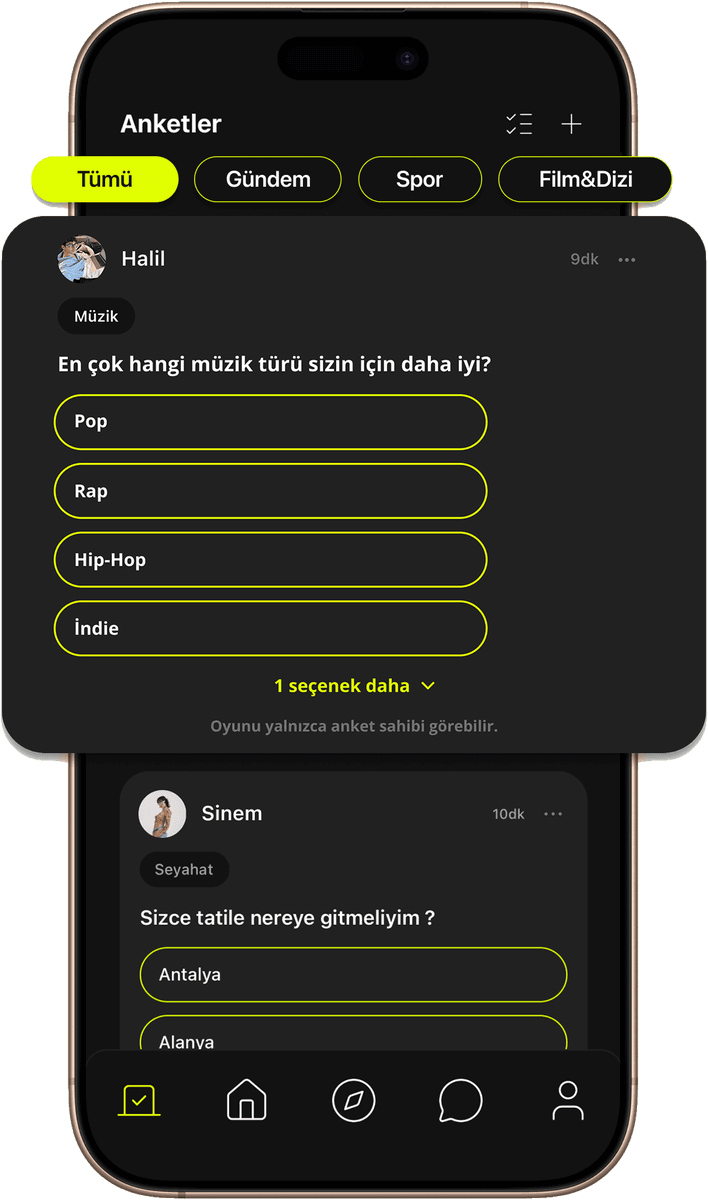
Toffe opens on the Polls tab — a continuous deck of questions other members are asking right now, newest first — except for up to five boosted polls, labelled Boosted, at the top of the first page. Each card shows who asked it, the topics it is filed under, the options, and how many comments it has. Tap one to vote. By default, results stay hidden until you do; the moment your vote lands, the card turns into percentage bars. Change your mind while the poll is still open and tap your choice again to take the vote back — on a poll that hides its results they hide themselves once more — and you can pick again.
- 01
Vote to see, by default
Unless the author chose otherwise, the counts and percentages on an open poll are not sent to your phone at all until you have answered, so nobody's choice is nudged by a running score. An author can switch that off when asking, and then the results show before anyone votes. Two further exceptions, both deliberate: you always see the numbers on a poll you wrote, and once a poll closes its results are public to everyone.
- 02
Sixteen topics, one flat list
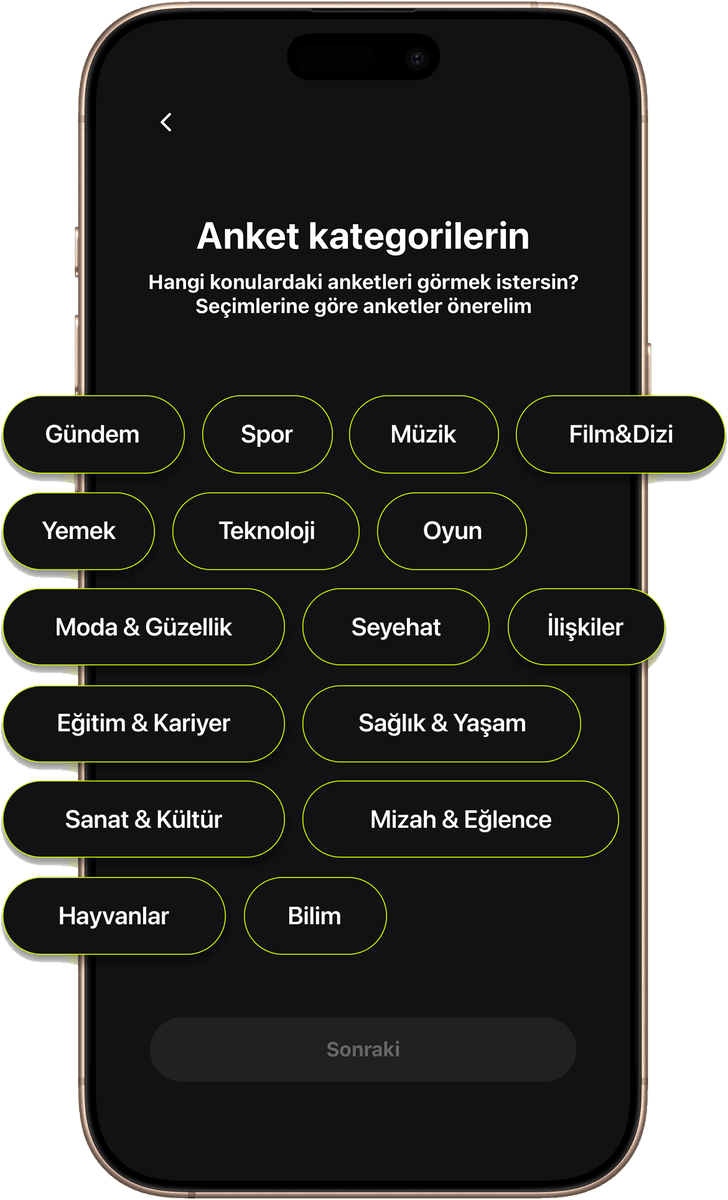
A chip rail above the deck holds All plus Trending, Sports, Music, Movies & TV, Food, Technology, Gaming, Fashion & Beauty, Travel, Relationships, Education & Career, Health & Lifestyle, Arts & Culture, Humor & Fun, Animals and Science. Pick one and the deck reloads around it.
- 03
Built to keep moving
Pull down to refresh the top of the deck, or tap the Polls tab again to jump back up and reload. Questions with more than four options collapse behind a show-more row.
- 04
Comments, open or closed
Any poll you can see takes comments of up to 500 characters — open or closed, and whether or not you have voted — and comments can be liked. You can delete your own comment at any time, and on your own poll you can delete anyone's; deleting a poll deletes its comments too. You are notified when someone comments on your poll or likes your comment. Links, contact details and words on our blocked list are refused before a comment is posted, and commenting is free.
- 05
Moderation on the same card
The menu on someone else's poll reports it — with the question itself attached, so a moderator sees what you saw — or blocks the person who wrote it. Comments carry the same menu: report a comment — its text is kept with the report — or block whoever wrote it, and a blocked member's comments disappear from every poll.
02 — Asking
Asking is free
Creating a poll costs nothing at all. Write a question of up to 140 characters, add between two and ten options of up to 60 characters each, file it under as many as three topics or leave it untagged, and choose how long it runs: 24 hours, three days, seven days, or no limit at all. Two visibility switches are yours too: whether results stay hidden until someone votes (on by default) and whether the voter lists are public (off by default). You can publish up to three polls in any rolling 24 hours. Links and contact details are refused in poll text.
- Question
- 140 characters
- Options
- 2–10, 60 characters each
- Duration
- 24 hours · 3 days · 7 days · no limit
- Limit
- 3 polls per 24 hours
- Trending
- Sports
- Music
- Movies & TV
- Food
- Technology
- Gaming
- Fashion & Beauty
- Travel
- Relationships
- Education & Career
- Health & Lifestyle
- Arts & Culture
- Humor & Fun
- Animals
- Science
- 01
Three polls per rolling 24 hours
You can open at most three polls in any rolling 24 hours — a moving window, not a calendar day. The limit lives on the server, so the deck never turns into one person's questionnaire.
- 02
No links, no contact details
A link, an email address or a phone number in poll text is refused at submission. The rule exists so questions stay questions.
- 03
Blank rows are fine
Option rows you leave empty are skipped silently — no “you missed a field” error.
- 04
Drafts are not kept
Leave the screen and what you typed is gone, so it is best to finish a poll in one sitting.
03 — Your polls
Your polls, and the ones you answered
Two lists on one screen: everything you have asked, and everything you have answered. A poll you have voted on stays in the deck, showing your choice and its results, and the Voted list is the permanent way back to it — tap a row and the full result card opens with the vote count.
- 01
You choose who sees your voters
Open a poll you created, tap any result row, and you get the list of members who picked that option. By default nobody else can see it. If you switch on public voters when you create the poll, anyone who can see the poll can open the list too, and the card says so before anyone votes. The setting cannot be changed once the poll is published.
- 02
Close it early, or delete it
As the owner you can end a poll before its time is up, which makes the results public, or remove it entirely, which deletes its comments too.
- 03
Counts move while you watch
Open one of your own polls and new votes arrive over a live connection, so the numbers change in front of you.
- 04
Boost a poll
Spend coins to boost one of your open polls for a set time: with a Boosted label it is shown in the area at the top of other members' poll deck, which holds at most five polls, while your own deck never shows your own poll. Before you confirm you see the price, the duration and that the coins are not refunded, and boosting again before it ends extends it. Boost slots are limited: once five polls are boosted a new boost cannot start, though extending your running boost always can. A poll that would close before the boost ends cannot be boosted. If you close or delete the poll before the boost runs out, the coins are not refunded. The button only appears while the app offers boosting.
04 — Meeting
Meet people through what they answer
An answer you did not expect is a better introduction than a profile photo. The person who wrote a poll is one tap away from the card, and Toffe's other two browsing surfaces work on the same idea: Home is the people you already follow, Toffe Club is the wider member grid.
- 01
Home
A rail of the people you follow who are online at this moment, and beneath it, large photo cards for everyone you follow — each one a shortcut into a conversation or onto their profile.
- 02
Toffe Club
A two-column grid of members across three tabs — All, Suggested and New — with username search from the header.
- 03
Filtering that starts with topics
The Toffe Club filter includes poll categories: pick several and the grid gets wider rather than narrower, because it matches anyone tagged with any of them. Age and level ranges, country, gender and star sign are there too, and the filter is remembered between launches.
- 04
Your profile
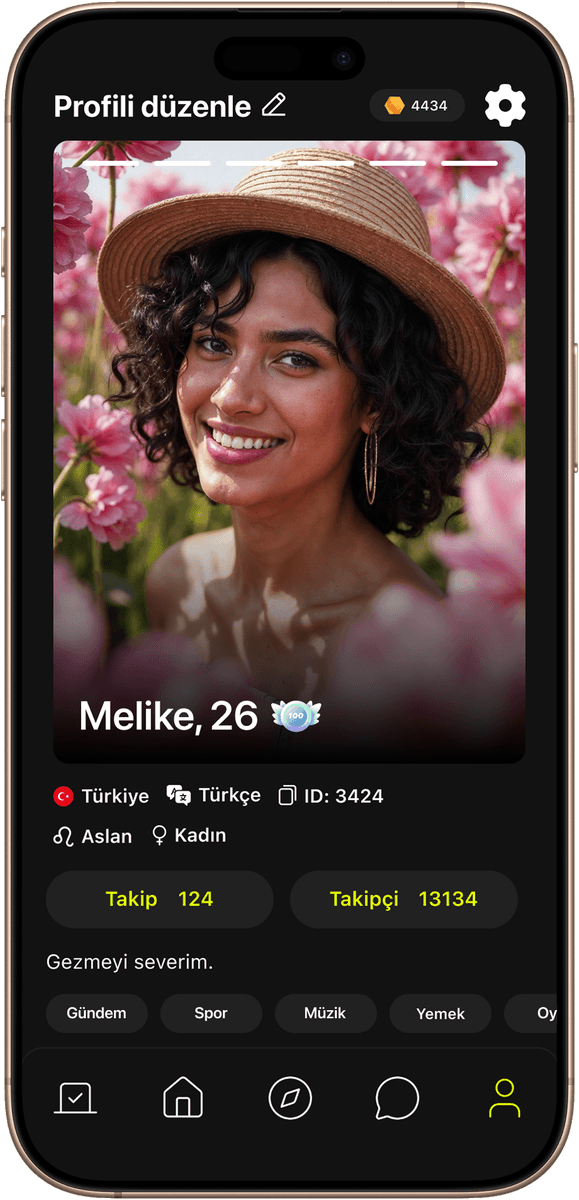
Up to six photos, a short bio, your level badge, and a rail of the poll topics you care about — the same sixteen the deck is filed under.
- 05
Following, without an approval step
Following is one-way and takes effect immediately. Your followers and following lists are yours to prune, and a live dot on every card shows who is around right now.
- 06
Who has been looking
A visitors list records anyone who opened your profile, with an unread marker on the home header. It is free, with nothing to unlock.
05 — Chat and calls
Chat, and calls that start there
Messaging is a modern inbox: swipe to reply, long-press for copy, reply, report or delete, typing indicators, read ticks, pinned threads and an unread badge that comes from the server rather than from whatever happens to be loaded. If your account language differs from the other person's, translation is offered automatically and starts switched on — shown underneath the original message, never in place of it. Voice and video calls start from the two buttons in a thread's header, or by re-dialling a row in your call history; there is no call button on a profile or a member card, and the two of you need to have messaged each other before a call can connect.
- 01
Everything stays in the call
The full-screen call overlay carries mute, camera flip, face effects in video calls (from level 10), speaker, receiver and Bluetooth routing, a chat panel, a gift picker and a coin top-up, so nothing makes you leave the call to do it.
- 02
You decide who can ring you
Two switches under Privacy turn incoming video and incoming voice calls off independently. They are enforced when the call is placed, not merely hidden in your copy of the app.
- 03
Gifts
One grid, shared by chat and calls, with each tile showing its own coin price. A tap selects; a separate Send button commits. Nothing is bought by a mis-tap.
- 04
Notifications you configure
Three switches cover new-message alerts, online alerts and whether notifications reach you mid-call. Permission is only ever requested when you tap something that needs it — never on first launch.
06 — Coins
What costs coins, and what does not
Downloading Toffe, creating an account and browsing are free, and so is everything on the polls surface except boosting: asking, voting, retracting a vote, reading results, seeing exactly who voted on your own questions, commenting and liking comments. The home feed, Toffe Club and its filters, search, following, profile visitors, notifications, online reminders, blocking and reporting are free too. Coins are the app's only currency, and they are spent on conversation — sending a message, sending a photo, sending a gift, and voice or video calls, which are billed per second to whoever placed the call. The person picking up pays nothing. The one other thing coins buy is a boost for one of your own polls. The cost of a message, a photo, a gift, a call or a boost is set on our servers and shown in the app the moment you spend, which is why there are no figures here. The price of a coin package itself is set by the App Store or Google Play and shown in your own currency on the purchase screen.
Free
- Downloading and signing up
- Creating polls — up to three per 24 hours
- Voting, and taking a vote back
- Seeing results
- Seeing who voted on your own polls
- Commenting on polls and liking comments
- The home feed
- Toffe Club and its filters
- Username search
- Following
- Profile visitors
- Notifications and online reminders
- Blocking and reporting
Costs coins
- Text messages
- Photo messages — priced separately
- Voice and video calls — per second, charged to the caller only
- Gifts
- Boosting your own poll — duration and price shown before you confirm
The cost of a message, a photo, a gift, a call or a boost is set on our servers and shown in the app the moment you spend, which is why there are no figures here. The price of a coin package itself is set by the App Store or Google Play and shown in your own currency on the purchase screen. The app does not sell subscriptions today; coins are one-off purchases.
- 01
The price sits where the spending happens
The message cost is written into the composer. The photo cost is checked against your balance before the picker even opens, so you never upload a file and get refused afterwards. Gifts carry their price on the tile, and a boost shows its price and duration in a confirmation before anything is spent.
- 02
Calls have guardrails
Your balance is refreshed before every outgoing call, a minimum is required to dial, and a confirmation appears before it rings. A low-balance warning fires about thirty seconds out, while there is still time to top up without leaving the call, and the call ends cleanly if the balance runs out.
- 03
Buying coins
Seven consumable packages through the App Store or Google Play, at the price your own store shows in your own currency. Receipts are verified on our side, and a Purchase History screen lists what you bought and whether the coins loaded. A one-off welcome grant lands on a new account, once per device.
- 04
Levels
Your level rises with your coin activity in the app; the badge appears on your profile and on your member card, and from level 10 it unlocks face effects in video calls. The app does not sell subscriptions today; coins are one-off purchases.
07 — Safety
Safety and control
Toffe is for adults. Date of birth is asked during sign-up and the picker will not accept a date under 18. Sign-up opens with the terms and safety rules, which you have to accept before anything else happens — on the phone route no verification code is even sent until you do — and it ends with the ground rules (18 and over only, no adult content, reports reviewed and rule-breaking accounts banned), which you acknowledge just before your account is created. Automated checks catch links, contact details and words on our blocked list, and screen profile photos as they are uploaded; everything else runs on reports, which is why reporting is never more than a couple of taps away.
- 01
Report from wherever you are
Member cards, profiles, poll cards, poll comments, chat threads and the in-call panel each carry a report action with ten reasons and room for a comment. A chat report attaches a screenshot of the thread automatically, because a message can be deleted long before a moderator reads the complaint; a comment report keeps the comment's text for the same reason.
- 02
Blocking is enforced on our side
A blocked member disappears from your home feed, Toffe Club, search, follow lists, visitors, the poll deck and poll comments, and the follow connection between you is removed. A blocked profile shows one neutral notice that does not reveal who blocked whom.
- 03
A help centre with evidence attached
A support form inside the app requires a screenshot, so a problem arrives with something to look at rather than a description of it.
- 04
Delete your account yourself
Settings, then Account Settings, then Delete my account: an in-app, confirmed, permanent close that ends every session, removes this device's push token and deletes your poll comments and comment likes. No email to send, no waiting on a reply.
- 05
Dark by design, in your language
A single dark theme with no light mode to fight, and Turkish or English chosen from your phone's language settings — including the per-app language picker on recent versions of Android and iOS.
FAQ
Common questions
What is Toffe, exactly?
A social app organised around polls. The first screen is a feed of questions other members are asking; you answer them, ask your own, and get to know people through the answers rather than through a profile grid. Chat, voice and video calls are there when a conversation is worth having, but the question comes first.
Who can see how I voted?
By default, only the person who created the poll can see which members chose an option. An author can instead switch on public voters when creating a poll; then anyone who can see that poll can see who chose what, and the poll card says so before you vote. Our own moderation team can also access these records when reviewing a report. By default the totals themselves are withheld until you have voted — they are not sent to your device before then — unless the author chose to show results before voting. Either way, you always see the numbers on your own polls, and a poll's results become public once it closes.
Is Toffe free?
Downloading, registering and browsing are free, and the polls surface is free apart from boosting: creating up to three polls in any rolling 24 hours, voting, taking a vote back, reading results, seeing your own voters, commenting and liking comments. The home feed, Toffe Club and its filters, search, following, profile visitors, notifications, reminders, blocking and reporting cost nothing either. Coins are needed for messages, photo messages, calls, gifts and boosting one of your own polls.
How do coins work, and how do I get them?
Coins are consumable credit. A text message costs coins, a photo message is priced separately, and voice and video calls are billed per second to the caller — the person receiving a call is never charged. Boosting one of your own open polls also costs coins: the price and duration are shown before you confirm, boosting again extends it, a new boost cannot start while five polls are already boosted (extending yours always can), a poll that would close before the boost ends cannot be boosted, and nothing is refunded if the poll is closed or deleted before the boost ends. Prices are set on our servers and shown in the app at the point of spending, which is why we do not print numbers on this page. Coins are bought in seven package sizes through the App Store or Google Play at your store's local price, and a one-off welcome grant lands on a new account, once per device. The app does not sell subscriptions today; coins are one-off purchases.
How do voice and video calls work?
A call starts from the two buttons in a chat thread's header, or by re-dialling a row in your call history — there is no call button on a profile or a member card, and you and the other person need to have messaged each other first. Before it rings, your balance is refreshed, a minimum is required, and you confirm. During the call you get mute, camera flip, face effects in video calls (from level 10), speaker and Bluetooth routing, a chat panel, gifts and a top-up. Each person can also switch off incoming video or voice calls entirely in Privacy, and that is enforced when someone tries to call.
What do I need to sign up?
You must be 18 or over — the date picker will not let an under-18 birth date through. Sign in with Apple, with Google, or with a phone number: the phone route verifies your number with an SMS code and then asks you to set a password of your own, which is what you sign in with afterwards. Before any of that you accept the terms and the safety rules. Then come a username, a birth date, a gender, a profile photo (this one you can skip and add later) and at least one poll topic. The topics are the last step; the ground rules you acknowledge come straight after them, and your account is created at that moment.
How do I report or block someone?
From wherever you encountered them. Every member card, profile, poll card, poll comment, chat thread and the in-call panel has a report action with ten reasons to pick from and space for a comment; a report filed from a chat attaches a screenshot of the thread on its own. Blocking sits in the same menus, behind one confirmation — except during a call, where reporting from the call screen blocks the other person and ends the call straight away, and the Block button on an incoming call takes effect immediately. It is applied on our servers, so the person disappears from every list you see. There is also a help centre form in Settings for anything a report does not cover.
How do I delete my account?
Settings, then Account Settings, then Delete my account. It is confirmed once and then permanent, it ends every session, and it removes this device's push token at the same time so no notifications follow you afterwards. Your poll comments and comment likes are deleted too. You do not have to email anyone or wait for us to act on it.
Download Toffe
Free on the App Store and Google Play. Requires iOS 15.1 or later, or Android 8.0 or later. Adults only, 18 and over. Creating an account and browsing cost nothing; messages, calls, gifts and poll boosts are paid for with coins, at the price shown in the app.
iOS 15.1+ · Android 8.0+ · 18 and over only